A Kalshi trading bot is just a script that watches Kalshi's markets and reacts on your behalf, buying or selling contracts based on rules you write instead of clicks you make. That's the whole concept, stripped of hype. Where it gets interesting, and occasionally misleading, is the gap between "I wrote a script that checks prices" and the viral screenshots showing four-figure gains in 48 hours.
Both things are true at once. Building a working Kalshi bot is genuinely achievable in an afternoon if you know basic Python. Turning that bot into something reliably profitable is a completely different, much harder problem, and most of what goes viral is survivorship bias wearing a nice screenshot. This guide walks through the real mechanics: how Kalshi's API actually works, how authentication is handled, a worked strategy example, where to find working open-source code, and how tools like Claude and OpenClaw fit into the picture honestly, not with the exaggeration that usually surrounds this topic.
What a Kalshi Trading Bot Actually Is
If we strip away the marketing language and a bot does three things on a loop: it pulls data, it evaluates a rule, and it sends an order if the rule triggers. Everything else, machine learning models, sentiment analysis, multi-agent frameworks, is decoration layered on top of that same basic loop.
Kalshi makes this accessible because it's a fully public REST API sitting behind a CFTC-regulated exchange. No special access tier required to start. You need a verified account, a generated key pair, and enough comfort with code to make an HTTP request. That's a lower bar than it sounds like, and it's a big part of why this exact niche, "build your own Kalshi bot," has become such an active corner of GitHub over the past year.
If you haven't traded on Kalshi manually yet and you're jumping straight to automation, that's worth pausing on. How Does Kalshi Work? A Complete Beginner's Guide covers the underlying mechanics, contract pricing, and settlement rules a bot is really just automating, and understanding that layer first makes debugging your own bot far easier later.
Kalshi's API: REST, WebSocket, and When You'd Actually Need FIX
Three ways to connect exist, and for almost everyone reading this, only two of them matter. REST handles the basics: pulling market data, placing orders, checking your portfolio. It's a normal request-response pattern, the same shape as any API you've probably already used.
WebSocket is the one people skip when they shouldn't. Instead of repeatedly asking "has the price changed yet," you open one persistent connection and Kalshi pushes updates to you the moment something happens, order book deltas, new trades, fills on your own orders. Polling every few seconds across fifty markets burns through your rate limit fast. A single WebSocket subscription doesn't.
FIX 4.4 exists too, and it's genuinely overkill for a first bot. It's the same protocol major stock exchanges use for institutional, low-latency trading, and it buys you speed measured in single-digit milliseconds rather than the couple hundred milliseconds a normal connection gets you. Unless you're running a strategy where that gap actually changes the outcome, skip it. Kalshi FIX 4.4 Protocol for Algorithmic Traders: Complete Setup Guide covers that path in full if you eventually get there, but it's not where a first bot should start.
Authentication: RSA-PSS Signing, No Login Required
Here's a detail that trips up a lot of people following slightly older tutorials. Kalshi's current authentication model has no login endpoint and no session token to refresh. Every private request gets signed individually using an RSA key pair: you generate the keys in your account settings, keep the private key somewhere safe, and sign each request fresh.
The signing process itself is mechanical once you understand it. You concatenate a timestamp, the HTTP method, and the request path, sign that string with your private key using RSA-PSS padding and SHA-256, then attach the result across three headers. No expiring token sitting in memory, no refresh logic to babysit. If you're reading a guide that mentions a 30-minute session token, that's describing an older version of the API. Current documentation drops that entirely in favor of per-request signing.
Getting the signature construction wrong is the single most common first-time failure, and it fails silently in an unhelpful way, usually just a 401 with no real explanation. A wrong timestamp format, a path that still has query parameters attached, or a method string that isn't uppercase will all break it. Kalshi's official developer documentation is the source to trust here, since this is exactly the kind of implementation detail that shifts over time and shouldn't be copied from a stale blog post.
The Demo Sandbox: Where You Should Actually Start
Kalshi runs a full parallel environment for testing, mirroring production exactly but funded with fake money. Point your bot at the demo API first, work out every bug there, and only move to real funds once you've watched it run cleanly for a while.
This matters more than it sounds like. A bot that places an order at the wrong price, doubles up on a position because of a retry bug, or misreads a resolution and holds a losing contract too long costs you nothing in the demo environment and real money in production. Skipping this step to "just see if it works" on a live account is a genuinely common and genuinely avoidable mistake.
A Simple Worked Strategy Example
Concepts are cheap. Here's something closer to real: a basic threshold strategy, the kind of first bot most people actually build.
The logic runs like this
- Pull the current price for a specific market on a set interval, or subscribe to it over WebSocket instead of polling.
- Compare that price against a threshold you've defined based on your own read of the market, say, buying YES if the price drops below 30 cents on a contract you think is undervalued.
- Check your existing position and available balance before firing an order, so you don't stack duplicate positions on repeated signals.
- Place a limit order at your target price rather than a market order, since a market order can fill at a worse price than you expected during a fast-moving stretch.
- Log every action, timestamp, price, and reasoning, since you can't improve a strategy you can't review afterward.
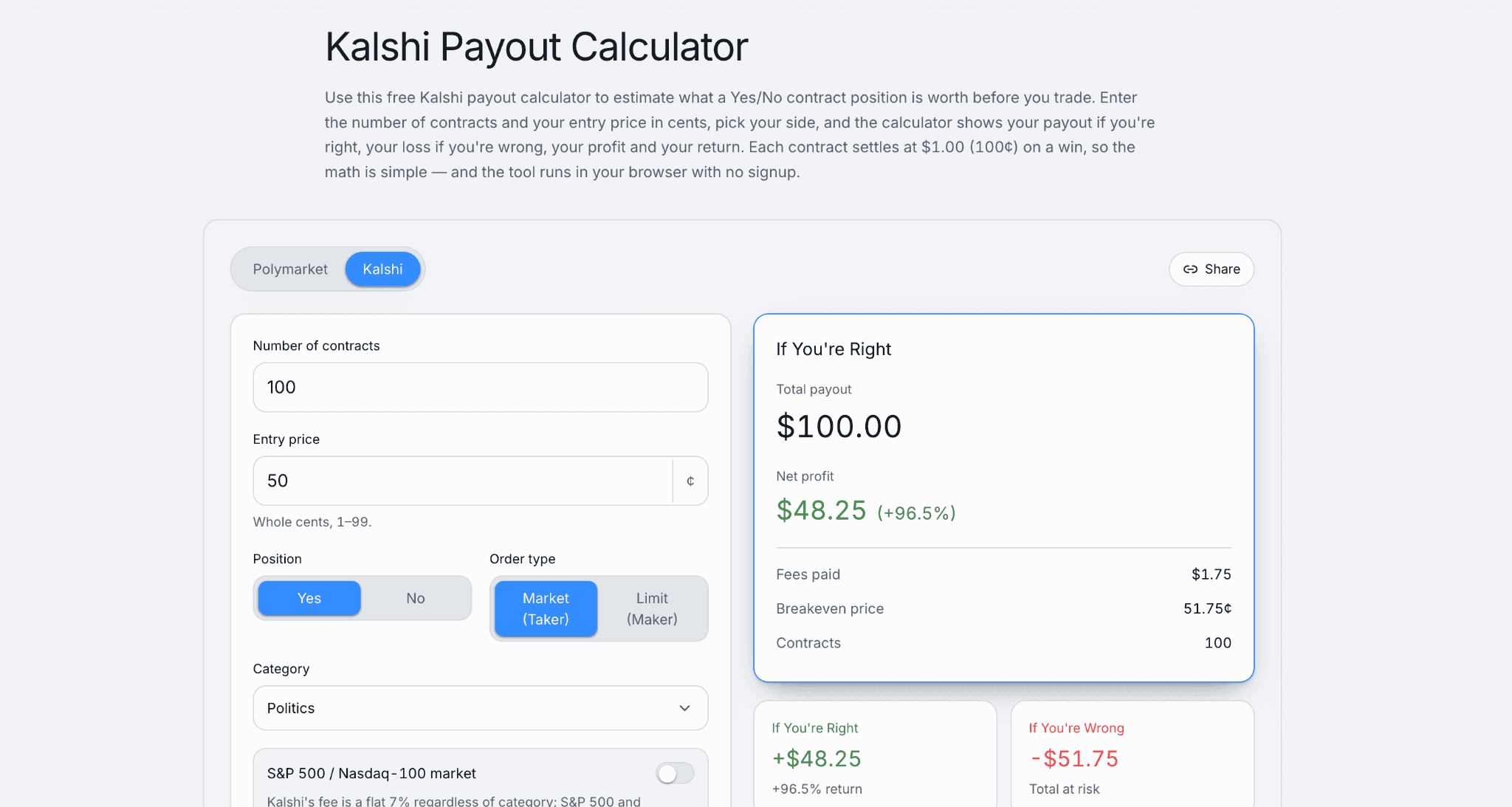
That's a mean-reversion bet dressed up in five steps, nothing exotic. It also won't make money by default. Prices sit below 30 cents because the market thinks the outcome is unlikely, and a bot that buys every dip without any actual edge is just donating money to whoever's on the other side of that trade. The strategy only works if your threshold reflects real insight, not just a number that felt reasonable at 11pm. Kalshi Prediction Market: 7 Strategies That Work in 2026 covers approaches with more substance behind them if a simple threshold isn't enough on its own.Try the Kalshi Payout Calculator to estimate your returns before every trade and make more informed trading decisions.
Open-Source Starting Points
You don't need to write a REST client from scratch. Several community projects already handle the boring parts, authentication, endpoint wrapping, rate limit tracking, so you can focus on the actual trading logic instead of plumbing.
A Kalshi trading bot github search turns up a real range: lightweight API wrappers that just simplify calls without trading anything themselves, data collectors that log prices for backtesting, basic threshold bots similar to the example above, and a smaller number of more ambitious projects layering machine learning or multi-source signals on top. Quality varies enormously, and star count is a weak signal here since a lot of small, useful utilities never accumulate much visibility.
Worth being specific about one real reference implementation rather than a generic "search GitHub" pointer. A working, credible open-source Kalshi trading bot repo is worth reading through end to end, less to copy directly and more to see how someone else structured authentication, order placement, and error handling in a project that actually runs.
If your interests lean toward Polymarket instead, or you want to compare tooling across both platforms, Top 10 Free GitHub Repos for Polymarket Trading in 2026 covers the equivalent landscape on that side.
A Kalshi bot github project worth flagging separately from full trading bots: pure API wrapper libraries. These don't place trades on their own, they just make Kalshi's endpoints easier to call from Python, JavaScript, Go, or whatever language you're already comfortable in. If you're building custom logic rather than forking someone's complete bot, starting from a wrapper and writing your own strategy on top is usually the more maintainable path.
What People Are Actually Building: Real Examples
Search Kalshi bot reddit and the honest picture that emerges is messier and more interesting than any polished tutorial. Plenty of "I built this over the weekend" posts, a fair number of people asking why their bot lost money on a strategy that looked fine on paper, and periodic threads where someone shares actual code rather than just a screenshot of gains.
A Kalshi trading bot reddit search specifically tends to surface more technical detail than general social media, since the audience skews toward people who actually run the code rather than just talk about it. Worth reading through a few of these threads before you start, not for a specific strategy to copy, but to calibrate expectations. Most bots posted there are simple, most don't disclose real performance over any meaningful stretch, and the ones that do disclose numbers are self-selected toward the winners, the same survivorship bias that shows up everywhere in this space.
Claude, OpenClaw, and the AI-Agent Angle
This is the part of the story that's genuinely new, and genuinely misunderstood in a lot of coverage. A Claude Kalshi bot setup means using Claude's reasoning ability, either through direct API calls in your own code or through a framework that wraps around it, to make trading decisions rather than hand-coding every rule yourself.
The Viral $14,216 Story, and What It Actually Proves
In March 2026, a comparison went viral showing a Claude-powered trading agent turning $1,000 into $14,216 on Polymarket in 48 hours, while a competing setup built on a framework called OpenClaw got fully liquidated over the same window. That post crossed a million views.
Worth being honest about what that number actually proves, which is not much on its own:
- Neither the strategy nor the risk parameters behind the $14,216 result were ever disclosed publicly.
- No independent source has reproduced or verified the numbers.
- Treat it as evidence that interest in this topic is real, not as a reproducible playbook.
What Is OpenClaw?
Openclaw Kalshi bot questions come up constantly, and here's where accuracy really matters. OpenClaw is an open-source autonomous agent framework that wraps around large language models like Claude and lets you install modular "skills," small capability packages that give the agent specific abilities.
Its name has changed twice:
- Launched as Clawdbot.
- Briefly renamed Moltbot after a trademark dispute with Anthropic.
- Settled on OpenClaw in January 2026.
It exploded past two million users in early 2026, which tells you how much appetite exists for this kind of tool generally.
Monitoring vs. Execution: The Nuance That Gets Missed
As of the most recent documentation, OpenClaw's Kalshi-specific skill is read-only. It can monitor markets, track prices, and alert you to changes, but it cannot execute a trade on Kalshi on its own. Actual order placement requires either a separate skill built specifically for that, or your own direct integration with Kalshi's API sitting underneath the agent.
This is a meaningfully different situation depending on which platform you're on. Conflating the two is a real, common mistake worth avoiding.
A Security Note
OpenClaw's rapid growth attracted real bad actors:
- Thousands of malicious third-party skills were pulled from its marketplace after being caught disguised as legitimate trading tools.
- Security researchers have documented thousands of publicly exposed instances online.
None of that means the framework is inherently unsafe to use. It does mean auditing any skill before installing it, and never treating an agent framework as a black box you can just point at your Kalshi account and walk away from.
For a fuller look at using Claude specifically, without the extra layer of an agent framework wrapped around it, How to Use Claude for Polymarket Trading in 2026 covers the direct-integration approach in more depth, useful context even though it's written with Polymarket as the primary example rather than Kalshi.
Build It Yourself, or Use a Framework?
If you're weighing whether to build Kalshi trading bot infrastructure yourself versus leaning on an existing agent framework, the honest tradeoff is control versus speed:
- Writing your own code gives you full visibility into every decision your bot makes.
- Wiring up an agent framework gets you running faster, but with a layer of abstraction between you and exactly what's happening under the hood.
Rate Limits, Fees, and Risk Notes
Kalshi's rate limiting moved to a token-bucket system in 2026, replacing a simpler flat request cap. Each account gets separate read and write token budgets that refill every second, and most requests cost 10 tokens against that budget, meaning your effective calls-per-second depends on your tier, not a single fixed number.
A rate-limited request returns a 429 with no automatic cooldown attached, no Retry-After header telling you how long to wait. The bucket just keeps refilling in the background, so a request that failed a moment ago often succeeds again within milliseconds once you retry. Build exponential backoff with a little random jitter into your retry logic rather than a fixed delay, and lean on WebSocket for anything that needs frequent updates instead of hammering REST endpoints on a timer.
Fees are simple by comparison: a flat 2 cents per contract, the same whether you're trading through the API, the website, or the mobile app. API access itself costs nothing extra. Your actual cost of running a bot is the trading fee plus whatever you spend on infrastructure, which for most personal projects is close to zero beyond electricity and maybe a small VPS.
None of this replaces basic risk discipline. A bot executes faster than you can think, which means a bad rule compounds losses faster too. Prediction Market Bankroll Management Guide covers position sizing principles that matter more, not less, once you've automated execution and removed the natural friction of manually clicking "confirm" on every trade.
If your bot's real edge is spotting price discrepancies rather than predicting outcomes outright, that's a different strategy family entirely, closer to arbitrage than directional betting. Manual vs. Automated Arbitrage on Polymarket: What You Actually Need to Get Started covers that approach on its own, including the execution speed problems that make manual arbitrage genuinely hard without automation.
The Bottom Line
Building a working Kalshi trading bot is a solved, accessible problem. The API is public, the demo environment is free, and community code exists to shortcut the boring parts. Building a profitable one is a completely separate, much harder problem that no tutorial, including this one, can handle.
Run your own payout math before sizing anything real, using Kalshi's payout calculator alongside whatever backtesting you've done, rather than trusting a strategy that only looked good on paper or in someone else's screenshot. The viral numbers are real events, mostly. They're just not evidence of a repeatable edge, and treating them as a blueprint is how most first bots lose money faster than a human trader would have.
FAQs
What is a Kalshi trading bot?
A Kalshi trading bot is a program that connects to Kalshi's API to monitor markets and place trades automatically based on predefined rules, rather than requiring a person to manually watch prices and click buy or sell. It can range from a simple script checking one market to a full system managing dozens of positions with real-time data feeds.
Is there a good Kalshi bot on GitHub?
Yes, several. A Kalshi trading bot github search turns up everything from lightweight API wrapper libraries to complete trading systems with built-in risk management, though quality and maintenance vary widely across projects. Reading through a project's code before running it, rather than trusting star count alone, is the safer approach.
What are people building for Kalshi bots on Reddit?
Kalshi bot reddit and kalshi trading bot reddit discussions mostly feature simple threshold and mean-reversion bots, occasional posts sharing real code, and a fair number of traders asking why a strategy that backtested well underperformed in live markets. It's a useful place to calibrate realistic expectations rather than a source of proven, ready-to-copy strategies.
Can I use Claude to build a Kalshi trading bot?
Yes. A Claude Kalshi trading bot setup typically involves calling Claude's API directly from your own code to handle reasoning and decision-making, while your code handles the actual order placement through Kalshi's API. Claude has no native, built-in connection to Kalshi, so this requires custom integration work rather than a plug-and-play product.
How do I build a Kalshi trading bot from scratch?
To build Kalshi trading bot infrastructure from the ground up, start by generating API keys from your Kalshi account, testing authentication against the demo sandbox, and building a simple strategy like a price threshold before adding complexity. Use REST for order placement and account management, WebSocket for real-time price data, and always validate your bot thoroughly in the demo environment before connecting it to real funds.
What is OpenClaw and can it trade on Kalshi?
OpenClaw is an open-source autonomous AI agent framework, originally called Clawdbot before being renamed OpenClaw in January 2026, that connects large language models to modular trading and monitoring skills. Its Kalshi-specific skill is currently read-only, meaning it can monitor markets and send alerts but cannot execute trades on Kalshi directly, unlike its Polymarket skills, which do support live trade execution.
Is Python the best language for a Kalshi trading bot?
Python is the most common choice for a kalshi trading bot python project, thanks to strong community support, readable syntax, and libraries suited to both API requests and data analysis. That said, Kalshi's API is a standard REST and WebSocket interface, so JavaScript, Go, Rust, Java, or C++ all work equally well if you're already more comfortable in one of those languages.