You need funds in your Polymarket account before you can place a bet, and that means sending crypto onto a supported chain first. For most people, this takes five to ten minutes if you already hold assets on Polygon, Arbitrum, or Base. It takes longer if you're starting from a bank account with no crypto yet. Below is every deposit path Polymarket supports, the minimum for each chain, what it actually costs, and the one mistake that costs people their funds.
What you need
- A Polymarket account (sign up with an email or connect a wallet)
- Crypto already sitting on a supported chain, or an exchange account you can buy from
- A wallet that can send on that chain: MetaMask, Coinbase Wallet, Phantom for Solana, or Polymarket's own built-in wallet
- Enough to clear that chain's minimum deposit (see the table below)
If you're starting from zero, Polygon or Base are the cheapest entry points. Network fees run a few cents, and the minimum is $2. Ethereum works too, but gas costs and a $7 minimum make it the expensive route for a first deposit. The thing that trips up most first-timers isn't the amount; it's picking the wrong network on the sending side, which brings us to the next part.
Before you send anything
Sending funds to the wrong network or address on Polymarket's deposit flow is not something support can undo. Polymarket's own documentation is direct about this: transactions sent to the wrong chain or address cannot be reversed. If you're sending USDC from Coinbase, for example, and you select the Ethereum network on Coinbase but Polygon in Polymarket's deposit screen, that USDC either fails to arrive or gets stuck on a chain Polymarket didn't expect. Match the network on both sides before you hit send, not after.
How to deposit on Polymarket
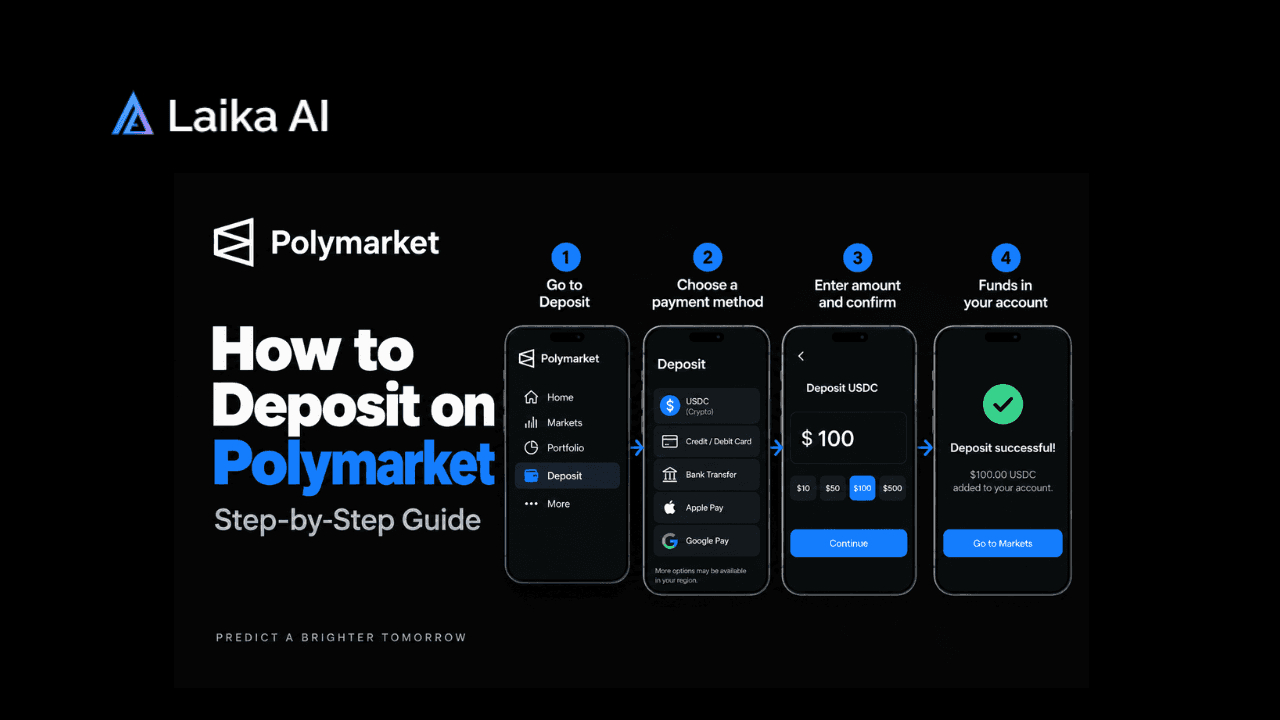
Overview: log in, open the deposit screen, pick a network and asset, send funds, wait for confirmation, check your balance.
- Log into Polymarket. Use your email or connect an existing wallet. New accounts don't need KYC to browse markets, though larger deposits or withdrawals can trigger identity checks later.
- Open the Deposit screen. You'll see a list of supported chains and assets rather than one fixed address. Polymarket runs this through a bridge, not a single wallet.
- Choose your chain and asset. Polygon, Arbitrum, Base, Optimism, and BNB Smart Chain all have a $2 minimum; Ethereum requires $7. Pick the chain where your funds already sit to skip an extra transfer.
- Copy the deposit address, or connect your wallet directly if Polymarket offers a one-click option for your chain. If you're copying an address by hand, paste it rather than retyping it. One wrong character sends the deposit nowhere recoverable.
- Send the funds from your wallet or exchange. Double-check the network selector on the sending side matches what you picked in step 3. This is the step most people rush.
- Wait for the bridge to convert your deposit. Whatever asset and chain you use, Polymarket's bridge converts it automatically into pUSD on Polygon, which is the collateral you actually trade with.
- Check your Polymarket balance. Once confirmations clear on the source chain, your USD balance updates in the top corner of the app. That balance updating is the finished-state signal, and you're ready to trade.
Minimum deposit by chain
Bitcoin and Tron aren't in Polymarket's main supported-chain table above, but both carry a $9 minimum where accepted, since bridging from those chains costs more. For a deeper breakdown of why these thresholds exist, see our Polymarket Minimum Deposit guide.
Does Polymarket charge deposit fees?
No. Polymarket itself doesn't charge a fee to deposit or withdraw. Its help center confirms there are no fees to deposit or withdraw USDC, though intermediaries like Coinbase or MoonPay may charge their own fees. So the cost you actually pay depends on the path you take, not on Polymarket's cut:
The fee you'll actually notice isn't a deposit fee. It's the trading fee charged once you place a bet. Crypto markets carry the highest taker-fee rate, and geopolitics markets remain fee-free, so which category you trade in matters more to your total cost than which chain you deposited on.
How to tell your deposit worked, and what to do if it didn't
Success test: your account balance in the top corner of Polymarket reflects the USD value of what you sent, and it's available to place a trade.
Deposit is stuck or missing
- Symptom: funds left your wallet but never show up in Polymarket. Cause: you likely sent below the chain's minimum, or the deposit is still waiting on confirmations. Fix: check the transaction on a block explorer for your chain first; if it confirmed and still hasn't appeared after the normal window for that path (see the speed column above), contact Polymarket support with the transaction hash.
- Symptom: you sent to the wrong network entirely. Cause: network selector mismatch between your wallet and Polymarket's deposit screen. Fix: Polymarket offers an on-chain recovery tool for exactly this situation, though recovery isn't guaranteed and can take time. Don't attempt a second transfer to "fix" it; that just adds a second stuck deposit.
- Symptom: balance shows but is smaller than expected. Cause: the asset you sent wasn't pUSD, and the auto-conversion rate or a card FX spread ate the difference. Fix: this is normal for non-stablecoin or MoonPay deposits. It's not a bug.
Depositing again, and what changes
Once you've done this once, repeat deposits are faster since your wallet already knows the address format and network for the chain you used. A few things do shift over time and are worth tracking rather than assuming:
- Which chain is cheapest changes with gas prices. Polygon and Base are consistently cheap; Ethereum gas spikes during busy periods and can make that $7 minimum cost more in fees than the deposit itself.
- Minimums are set per chain by Polymarket, not fixed forever, so check the current table before a large transfer rather than relying on memory.
- If you're funding an account to act on a specific event, timing matters more than the deposit method. Markets like the Epstein files release or the California wealth tax vote can move fast enough that a slow Ethereum bridge deposit costs you the entry price you wanted.
Traders using Laika to track wallet activity and live order books on Polymarket can watch a deposit's status alongside the market they're about to trade, rather than tabbing between a block explorer and the Polymarket app separately.
Once your deposit clears
A funded account is the starting point, not the finish line. If you're new to Polymarket specifically for sports markets, our guide on Polymarket sports trading strategies covers approaches that work once your balance is live. And since Polymarket's bridge runs on infrastructure connected to broader institutional blockchain settlement, the same category of network covered in our Canton Network breakdown, it's worth understanding the plumbing if you plan to move larger amounts regularly.
If your deposit hasn't shown up after checking the block explorer and waiting past the normal window for your chosen path, that's the point to contact Polymarket support directly rather than troubleshooting further on your own.
Frequently Asked Questions
Why can't I deposit money on Polymarket?The most common causes are sending below the minimum for that chain ($2 on most L2s, $7 on Ethereum), selecting the wrong network on your wallet or exchange, or a deposit still waiting on confirmations. Check the transaction on a block explorer before assuming it failed.
What crypto does Polymarket use?
Polymarket accepts deposits across several chains and assets, including ETH, USDC, USDT, POL, SOL, and others, but everything gets automatically converted to pUSD on Polygon once it arrives, since that's the collateral used for trading on the platform.
Does Polymarket accept credit cards?
Yes, through a built-in MoonPay integration. Polymarket partnered with MoonPay to let users buy crypto with credit cards, debit cards, Apple Pay, Google Pay, or PayPal directly from the deposit screen, rather than requiring you to buy USDC elsewhere first. One caveat: MoonPay's card option isn't available to U.S. users, so American traders need the crypto-transfer route or Polymarket's separate, invite-gated US ACH product instead.
How long does a Polymarket deposit take?
It depends on the path. A card deposit through MoonPay lands in 2 to 5 minutes since it skips a separate wallet transfer. A crypto transfer from an exchange like Coinbase to Polygon typically clears in 10 to 30 minutes, mostly network confirmation time, not Polymarket's processing. Bridging funds from Ethereum mainnet is the slowest common path, 20 minutes to an hour, gated by L1 gas and bridge confirmation rather than Polygon's faster block times. Bank transfer through Polymarket US ACH is the outlier at 1 to 3 business days.
What are Polymarket's deposit methods?
Direct crypto transfer on any supported chain, or a card/Apple Pay/Google Pay/PayPal purchase through the built-in MoonPay widget (not available to U.S. users). U.S. traders can instead use Polymarket's separate ACH bank-transfer product, though access has been invite-gated