Nobody warns you about the fee trap until after you have already walked into it.
You decide to try Polymarket. You read that gas fees are nearly zero. You buy $50 in USDC. You send it to your wallet on Ethereum mainnet because that is the default network your exchange suggests. You pay $18 in gas. You get to Polymarket and realise the platform runs on Polygon, not Ethereum. You pay another $2 to bridge. You now have $30 left from your original $50 before placing a single trade.
This is the most common beginner mistake on Polymarket in 2026. It is entirely avoidable if someone tells you the right order of operations before you start.
This guide covers exactly how to set up your wallet correctly, fund it without burning money on unnecessary fees, connect to Polymarket, and place your first trade on a real market.
But here is something most setup guides never mention: having a working wallet is only the beginning. Once the technical part is done, you face a harder problem. Over 4,000 active markets are live on Polymarket right now. The Fed Decision market has $185.8 million in volume. The 2026 NBA Champion market has $338.1 million. The 2028 Democratic Presidential Nominee market has $1.1 billion. Which of these is mispriced? Which one should you actually trade? That is where most people get stuck, and that is exactly what Laika AI’s Polymetric is built to solve. We will get to that. First, let us get your wallet working.
What Polymarket Actually Is Before You Touch a Wallet
Polymarket is a prediction market running on the Polygon blockchain. Every trade is a blockchain transaction. Every position is a smart contract. Your money sits in a wallet you control, not in a platform account a company controls.
This is the source of both Polymarket's biggest advantage and its steepest learning curve for newcomers.
The advantage: when you win, the payout is automatic, instant, and goes directly to your wallet. No withdrawal requests, no business-day waiting periods, no counterparty deciding whether to pay you.
The learning curve: you are fully responsible for your own security. If you lose your seed phrase, your funds are gone permanently. If you send funds to the wrong network, recovery is sometimes impossible.
Step 1: Choose Your Wallet Type
Polymarket in 2026 supports two wallet approaches.
Option A: Email signup (for complete beginners)
Sign up at polymarket.com with an email address and Polymarket automatically creates a smart contract wallet for you. No seed phrase to manage, no network configuration required. You can start trading within minutes.
The trade-off is that this wallet is tied to your Polymarket account. It is the simplest path but offers less flexibility for advanced users.
Option B: MetaMask or compatible Web3 wallet (for crypto-native users)
MetaMask is a browser extension and mobile application that creates a standard cryptocurrency wallet you fully own. Your seed phrase is yours alone. The wallet works across any blockchain application, not just Polymarket.
Step 2: Set Up MetaMask Correctly
Install MetaMask from the official source only.
Go to metamask.io and download the browser extension for Chrome, Firefox, or Brave, or the mobile app for iOS or Android. Never install from any other source. Fake MetaMask extensions designed to steal seed phrases are a consistent and active threat.
After installation, select Create a New Wallet and follow the setup steps.
Write your seed phrase on paper immediately.
MetaMask generates a 12-word seed phrase during setup. This is the only credential that restores wallet access if you lose your device, uninstall the app, or forget your password. Write it on paper. Store that paper in a physically secure location. Do not photograph it. Do not type it into any note-taking app, cloud service, or messaging platform. Do not share it with any person or website, ever.
No legitimate platform, support agent, or community member will ever ask for your seed phrase. If anyone asks for it, they are attempting to steal your funds.
Add the Polygon network to MetaMask.
MetaMask defaults to Ethereum mainnet. Polymarket runs on Polygon. Go to chainlist.org, search for Polygon, and click Add to MetaMask next to the Polygon Mainnet entry. This automatically populates all the correct settings. After adding it, switch to Polygon by clicking the network dropdown at the top of MetaMask and selecting Polygon Mainnet.
Step 3: Fund Your Wallet Without the Fee Trap
This is where most beginners lose real money. The principle is simple: get USDC onto the Polygon network directly, without routing through Ethereum mainnet.
Method 1: Withdraw USDC from Coinbase directly to Polygon (recommended)
Buy USDC on Coinbase. When you withdraw, Coinbase lets you choose which network to send on. Select Polygon explicitly. The withdrawal fee is typically $0.50 to $2.00. Your USDC arrives in your MetaMask wallet on Polygon, exactly where Polymarket needs it.
Method 2: Withdraw from any exchange supporting Polygon
The process is identical on Kraken, Binance, and others. Buy USDC, withdraw, select the Polygon network, send to your MetaMask address.
The fee comparison:
If you deposit $500 via MoonPay at 4.5%, you lose $22.50 before placing a trade. If you send USDC on Polygon from Coinbase, you lose less than $2. The maths is obvious.
Also buy a small amount of POL for gas.
POL is Polygon's native token and you need it to pay for blockchain transactions. Without it, your trades fail even if you have plenty of USDC. You need approximately $1 to $3 worth of POL for hundreds of transactions. Buy it on any major exchange and withdraw to Polygon, or swap a small amount of your USDC for POL on QuickSwap after you arrive.
Step 4: Connect Your Wallet to Polymarket
Go to polymarket.com and bookmark the URL. Fake Polymarket websites designed to drain connected wallets are a real and active threat. Bookmarking the official URL and navigating directly rather than through search results is basic but important security hygiene.
Click Connect Wallet on the homepage. Select MetaMask. MetaMask opens and asks you to approve the connection. Click Connect. Polymarket then asks you to sign a message to verify wallet ownership. This signature costs no gas and moves no funds. It simply proves you own the wallet.
Your wallet is now connected. Your USDC balance displays in the top right of the interface.
Step 5: Deposit USDC Into Polymarket
Your USDC is in MetaMask on Polygon. To trade, move it into your Polymarket account. Click Deposit, select USDC, enter your amount, and confirm the transaction in MetaMask.
Polymarket converts your USDC to pUSD, the platform's internal collateral token backed 1:1 by USDC. You do not need to manage this conversion. When you withdraw, pUSD converts back to USDC automatically.
The one-time approval transaction during your first deposit authorises Polymarket's smart contract to interact with your USDC. This is standard for any DeFi application. It costs less than $0.05 on Polygon.
Step 6: Understanding What You Are Looking At
Now look at the live Polymarket interface. The screenshots above show you the current state of the platform.
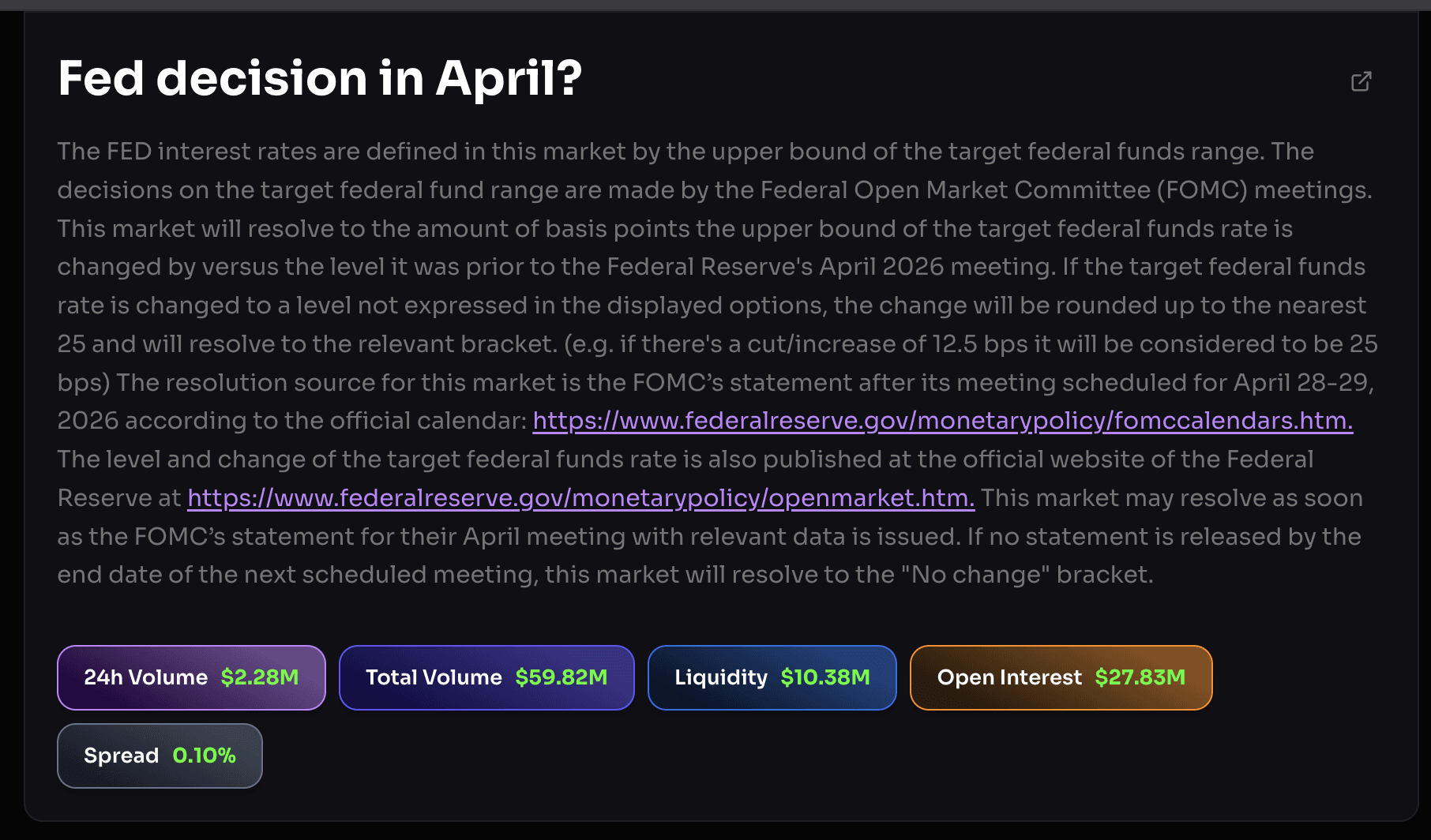
The Fed Decision in April market has $185.8 million in volume, $32 million in liquidity, and the current probability of no change sits at 99.8%. The market resolves based on the FOMC statement after the April 28 to 29 meeting. The spread is 0.10%.
The 2026 NBA Champion market has $338.1 million in volume with 64 days remaining. San Antonio Spurs lead at 16%.
The Democratic Presidential Nominee 2028 market has $1.1 billion in total volume. Chelsea Clinton, Oprah Winfrey, and LeBron James are all priced at 1%.
Each market card shows the question, current outcome prices as probabilities, total volume, liquidity, and time remaining. When you click into a market, you see the full resolution criteria, the spread, open interest, and the Analytics, Top Traders, and Holders tabs that reveal who is making money and what they are doing.
The filter system for finding the right markets
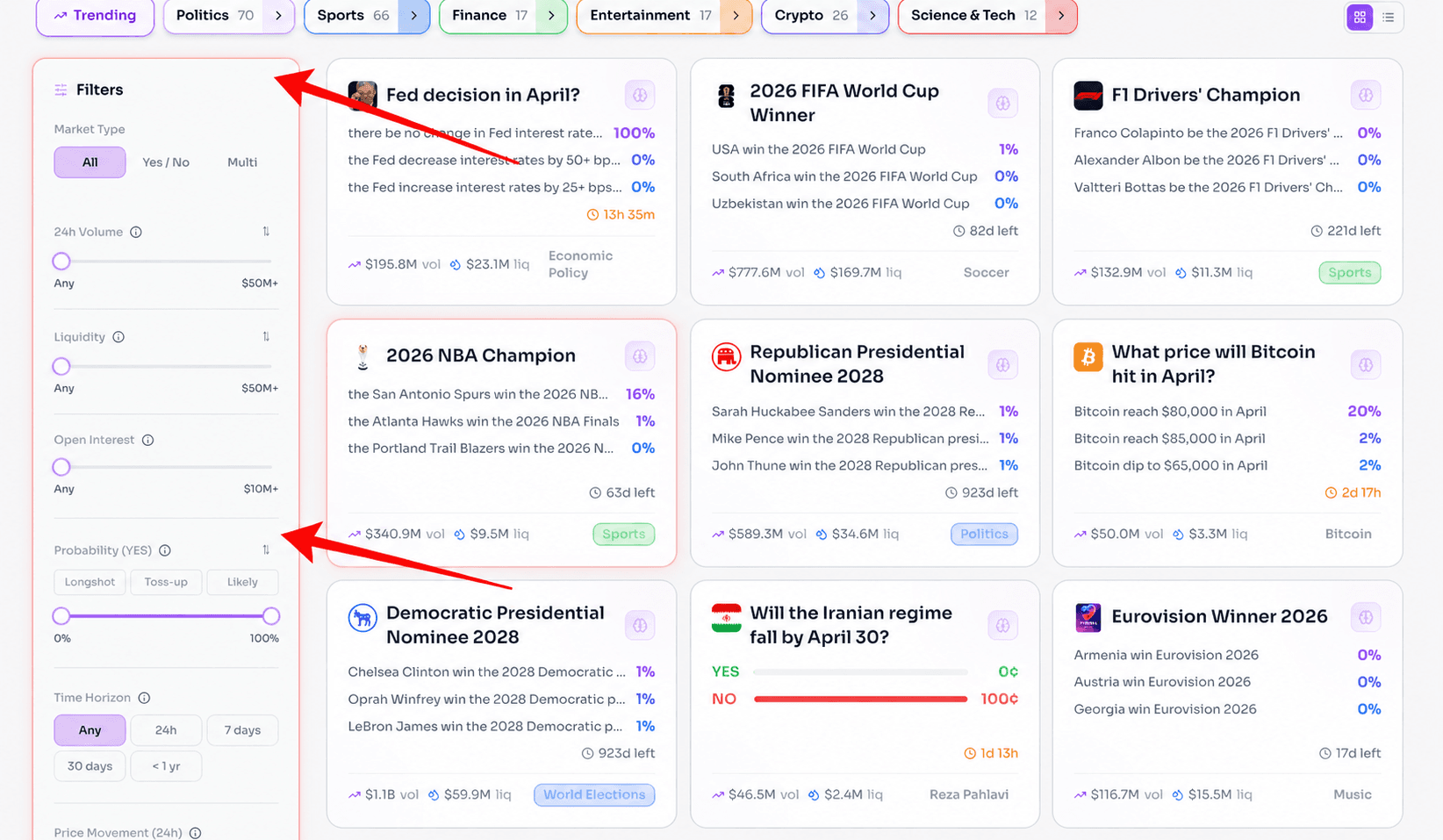
The filter panel in the screenshots shows how to narrow 4,000-plus active markets to the ones worth your time. Filter by market type, 24-hour volume, liquidity, open interest, probability range, and time horizon.
A practical starting filter for new traders:
- 24h volume above $1 million: ensures you can enter and exit without slippage
- Liquidity above $500,000: ensures tight spreads
- Time horizon 7 to 30 days: short enough to see resolution, long enough for analysis to matter
- Probability between 20% and 80%: where the most interesting mispricings tend to live
This narrows thousands of markets down to the handful worth serious attention on any given day. But filtering is just the first step. The harder question is: of the 20 markets that pass your filter, which one is actually wrong?
This Is Where Most Traders Get Lost
You have the wallet. You have the funds. You understand how to execute a trade. And now you are looking at a screen with dozens of active markets, prices moving in real time, and no clear signal about which direction is right.
The Fed Decision market is at 99.8% for no change. You would not touch that. But the NBA Champion market at San Antonio Spurs 16%, is that too high or too low? You would need current standings, recent injury reports, playoff bracket positioning, and historical precedent for teams at equivalent positions to answer that question properly.
And while you are researching the NBA market, the Fed Decision market just moved from 99.8% to 99.1% because of something that dropped in the last ten minutes. Did you see that? What caused it? Does it matter?
This is the real challenge of trading Polymarket. It is not technical, it is informational. The platform moves faster than any individual trader can manually monitor, and the 8% of wallets that make money consistently are almost always the ones with a systematic process for knowing what to watch and when to act.
That is exactly the gap Laika AI fills.
Why Serious Polymarket Traders Use Laika AI
Here is what actually happens when you try to trade Polymarket without the right tools.
You open the platform. You see the NBA Champion market. You think San Antonio at 16% seems interesting based on what you have been following. You buy 200 YES shares at $0.16, spending $32. The next morning, a significant injury is reported for a key Spurs player. The market drops to 9%. You are down $14 on a $32 position. Not because your research was lazy. Because you did not see the on-chain signal that informed wallets started exiting the position three hours before the news hit mainstream coverage.
This is the pattern that repeats across every category on Polymarket. The traders who win are not necessarily smarter. They are faster and better informed. They see the signals before the crowd does.
Laika AI is built specifically to give every trader access to those signals without needing to monitor hundreds of markets manually or build your own blockchain analytics infrastructure.
Here is what Laika does in practical terms:
- Real-time on-chain market monitoring.
- Smart money tracking.
- Market signal aggregation.
- Platform announcements and market creation alerts.
The result is that instead of reacting to Polymarket, you are ahead of it. Instead of discovering that the Spurs position moved after it already moved, you are seeing the signal when it first appears.
The Fee Reality: What Trading Actually Costs
Gas fees per trade: Less than $0.01 per transaction on Polygon. A full round trip entering and exiting a position costs approximately $0.02 to $0.04.
Platform trading fee: Polymarket introduced a 0.10% taker fee in February 2026 on market orders that execute immediately. Maker orders that add liquidity at a specific price are currently free or earn a rebate.
Spread cost: On liquid markets like the Fed Decision contract above with a 0.10% spread, the effective entry and exit cost is minimal. On thin markets with low volume, spreads can reach 5% to 10%. Always check the spread on the market detail page before entering any position.
The real comparison:
Polymarket is structurally cheaper than any sportsbook at the same position size. The key is trading liquid markets and using limit orders whenever possible to avoid the taker fee and minimise spread.
The Five Mistakes That Cost Beginners the Most Money
Mistake 1: Sending funds on the wrong network
Always confirm you are on Polygon before sending. Verify the network label on both your wallet and your exchange withdrawal screen before confirming any transaction.
Mistake 2: Using MoonPay for large deposits
MoonPay is convenient but charges up to 4.5% per transaction. Fine for a $20 test. Expensive for $500. Use an exchange withdrawal for any meaningful deposit.
Mistake 3: Trading on thin markets with wide spreads
The spread on a liquid market like the Fed Decision contract is 0.10%. The spread on a niche market with $50,000 in total volume can be 10% or more. You are already down 10% the moment you buy. Always check the spread on the market detail page first.
Mistake 4: Running out of POL for gas
When your POL balance hits zero, your trades fail. Keep $2 to $3 worth of POL in your wallet at all times. It covers hundreds of transactions and takes two minutes to top up.
Mistake 5: Trading without knowing what the smart money is doing
This is the most expensive mistake and the hardest to quantify without data. The top wallets on Polymarket are not guessing. They are acting on signals, on-chain movements, and primary source data that most retail traders never see. Trading without knowing what those wallets are doing means you are often on the wrong side of informed money without realising it.
Laika AI closes this gap by making smart money movements and real-time market signals visible before they have already been priced in.
Frequently Asked Questions
What is the cheapest way to deposit money into Polymarket in 2026?
The cheapest method is buying USDC on Coinbase, Kraken, or any major exchange that supports Polygon withdrawals, then withdrawing directly to your MetaMask wallet on the Polygon network. The typical cost is $0.50 to $2.00. Avoid Ethereum mainnet withdrawals which cost $5 to $20 in gas. Avoid MoonPay for deposits above $100, as it charges up to 4.5% of the transaction amount.
Do I need POL tokens to trade on Polymarket?
Yes. POL is Polygon's native token and is required to pay gas fees on every transaction. You need approximately $1 to $3 worth of POL to cover hundreds of trades. Without it, transactions fail even with plenty of USDC in your wallet. Buy a small amount from any major exchange alongside your USDC, or swap a small portion of your USDC for POL on QuickSwap after funding your wallet.
What is pUSD and is it the same as USDC?
pUSD is Polymarket's internal collateral token, backed 1:1 by USDC. When you deposit USDC into Polymarket, it automatically converts to pUSD for trading. When you withdraw, pUSD converts back to USDC automatically. The conversion is seamless and you do not need to manage it. One pUSD always equals one US dollar.
Disclaimer
This article is for educational purposes only and does not constitute financial or investment advice. Prediction market trading involves real financial risk. Always verify the current regulatory status of Polymarket in your jurisdiction before depositing funds.